Creating a service network with Kubernetes and accessing a backend service using a gateway
This tutorial describes how to connect a local backend service on a local machine with a frontend service running on a Kubernetes cluster.
In this tutorial, the services are the same as used in Creating a service network with OpenShift, however you run the backend service locally and expose the service on the service network using the skupper command-line interface (CLI).
-
Access to a projects in a Kubernetes cluster,
cluster-adminaccess is not required. -
Python on your local machine.
This tutorial shows how to connect the following:
-
west- a namespace in an accessible OpenShift cluster running the frontend service. -
hello-world-backend- a Python service running on a local machine.
| Although this tutorial demonstrates exposing a Python service on the service network, a more typical use case would involve a database service, for example, MySQL. |
1. Introduction to Skupper
A service network enables communication between services running in different network locations. It allows geographically distributed services to connect as if they were all running in the same site.
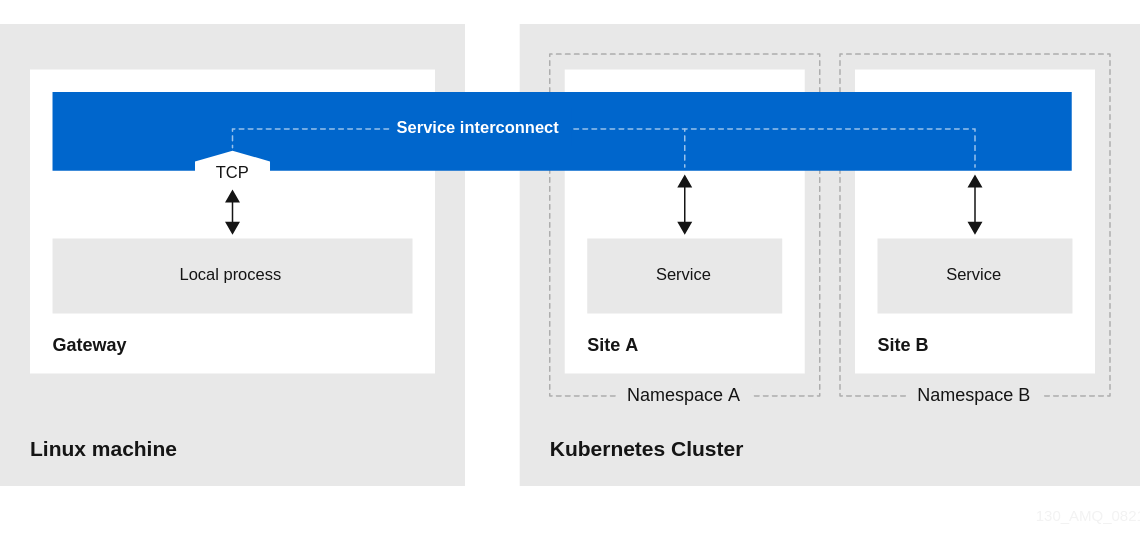
For example, you can deploy your frontend in a public Kubernetes cluster and deploy your backend on a local network, then connect them into a service network.
You deploy and manage a service network, including a gateway, using the skupper CLI.
2. Installing the skupper CLI
Installing the skupper command-line interface (CLI) provides a simple method to get started with Skupper.
-
Install the
skuppercommand-line interface.For Linux:
$ curl -fL https://github.com/skupperproject/skupper/releases/download/1.0/skupper-cli-1.0-linux-amd64.tgz | tar -xzf -
For MacOS:
$ curl -fL https://github.com/skupperproject/skupper/releases/download/1.0/skupper-cli-1.0-mac-amd64.tgz | tar -xzf -
-
Copy the
skupperexecutable to a directory in your $PATH:$ mkdir -p $HOME/bin $ export PATH=$PATH:$HOME/bin $ mv skupper $HOME/bin
-
Verify the installation.
$ skupper version
client version 1.0
3. Creating a backend service
This procedure describes how to create a backend service on your local machine that is accessed from the service network.
-
Python
-
Clone the skupper-example-hello-world repo.
-
Change to the service directory.
$ cd skupper-example-hello-world/backend/ -
Install the required libraries.
$ pip install --user flask starlette uvicorn -
Run the backend service
$ python ./main.pyThe output is similar to the following:
INFO: Started server process [107836] INFO: Waiting for application startup. INFO: Application startup complete. INFO: Uvicorn running on http://0.0.0.0:8080 (Press CTRL+C to quit) -
Test the service by navigating to the following URL.
http://localhost:8080/api/helloThe output is similar to the following:
Hello from workstation (1)This indicates that the backend service is running and available.
4. Logging into cluster
-
The kubectl CLI is installed.
-
Start a terminal session to work on the
westnamespace and set theKUBECONFIGenvironment variable:$ export KUBECONFIG=$HOME/.kube/config-westThis session is referred to later as the west terminal session.
-
Log into the Kubernetes cluster.
5. Creating a skupper site
-
Create the
westnamespace:$ kubectl create namespace west $ kubectl config set-context --current --namespace west -
Create the service network site:
$ skupper init -
Check the site status:
$ skupper statusThe output should be similar to the following:
Skupper enabled for namespace 'west'. It is not connected to any other sites.
6. Creating the frontend service
The frontend service is a simple Python application that displays a message from the backend application.
Perform all tasks in the west terminal session:
-
Deploy the frontend service:
$ kubectl create deployment hello-world-frontend --image quay.io/skupper/hello-world-frontend -
Expose the frontend deployment as a cluster service:
$ kubectl expose deployment hello-world-frontend --port 8080 --type LoadBalancer -
Create a route for the frontend:
$ oc expose svc/hello-world-frontend -
Check the frontend route:
-
Get the route details:
$ oc get routesThe output should be similar to the following:
NAME                   HOST/PORT
hello-world-frontend   <frontend-url>
-
Navigate to the
<frontend-url>value in your browser, you see a message similar to the following because the frontend cannot communicate with the backend yet:Trouble! HTTPConnectionPool(host='hello-world-backend', port=8080): Max retries exceeded with url: /api/hello (Caused by NewConnectionError('<urllib3.connection.HTTPConnection object at 0x7fbfcdf0d1d0>: Failed to establish a new connection: [Errno -2] Name or service not known'))To resolve this situation, you must make the backend service available on the service network using a gateway.
-
7. Creating and using a Skupper gateway
This procedure describes how to create a gateway and make a backend service available on the service network.
-
Skupper router is installed on local machine
-
Create a gateway:
$ skupper gateway init --type podman -
Create a Skupper service:
$ skupper service create hello-world-backend 8080 -
Bind the local backend service to the Skupper service:
$ skupper gateway bind hello-world-backend <backend-ip-address> 8080where the <backend-ip-address is the address you noted in Creating a backend service
-
Check the gateway status:
$ skupper gateway statusThe output should be similar to following:
Gateway Definitions:
╰─ <machine>-<user> type: podman version: 1.17.1
 ╰─ Bindings:
    ╰─ hello-world-backend:8080 tcp hello-world-backend:8080 <backend-ip-address> 8080
8. Checking service access from the frontend
-
Get the URL details:
$ kubectl get service hello-world-frontend -o jsonpath='{.status.loadBalancer.ingress[0].ip}'Use the output IP address to construct the <frontend-url>:
<cluster-ip-address>:8080/
-
Navigate to the
<frontend-url>value in your browser and click Say hello. You see a message similar to the following:Hi, <name>. I am Mathematical Machine (backend-77f8f45fc8-mnrdp).
If you click Say hello again, a different backend process responds showing how Skupper balances the requests.
This shows how the frontend calls the backend over the service network from an Kubernetes cluster.